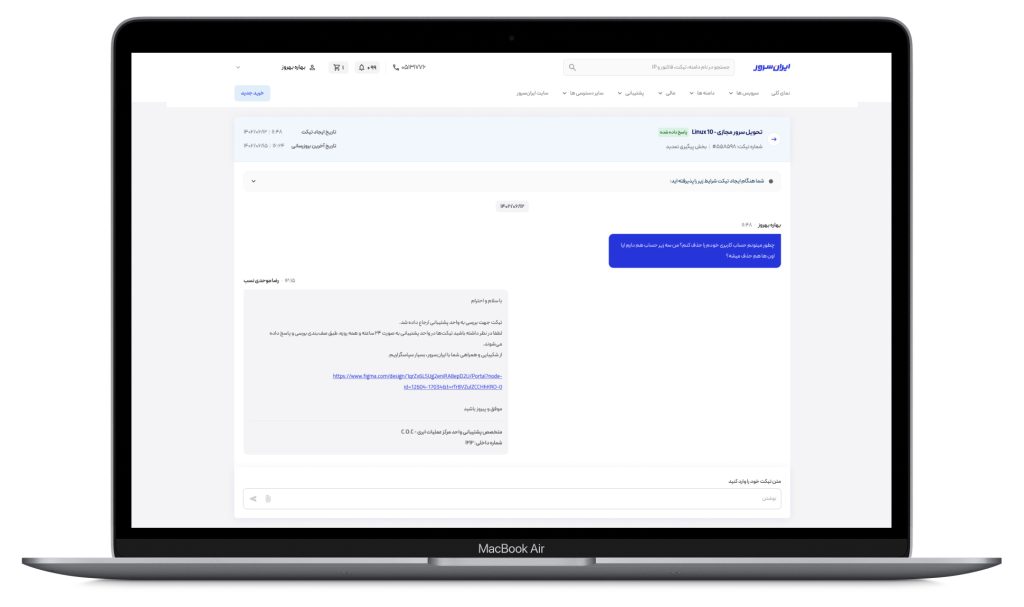
Introduction
Support tickets are crucial for customer communication, issue resolution, and maintaining satisfaction. They provide valuable feedback and insights for improvement. By optimizing our ticketing system, we aim to enhance customer experience and reduce support costs.
services with Iranserver. After reviewing, we realized that there was a very common and repetitive question and problem: Your ticket creation process is long, and I get lost in finding different departments and topics in this process!
- The user calls Iranserver and asks about the ticket process and choosing the topic and department.
- The support team guides him.
- The support team may open a ticket for the user and then ask him to upload the necessary information in the ticket.
While this process worked, it also had its own problems.
.
.
My Role
My role in this project, as a designer, was to optimize workflows to create a better experience and significant improvements in this project.
.
Method and Framework
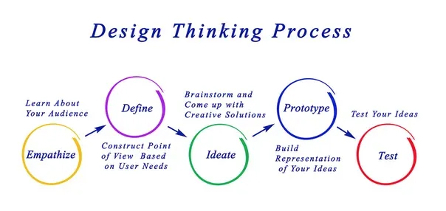
In this process, I used the Design Thinking method, which consists of 5 stages and greatly helped me in finding and solving user problems.
Stakeholders:
- Product team: Identifies user needs, prioritizes features, and sets the overall direction of the product.
- Support team, call center, quality control: Directly interacts with users, identifies their problems, and provides valuable feedback.
.
stage 1: Empathy and Needs Understanding
In this stage, I interacted with two groups: project stakeholders and users.
To understand the needs of these groups, I held a meeting with the product team managers, support, call center, and quality control.
In this meeting, we reviewed support tickets and calls received over the past three months.
(In the first phase, we addressed needs that were very clear and obvious to create a suitable foundation for addressing direct user needs in future phases.)
The following needs were a list of items discussed in this meeting:
- Other option: Most users select the other option as a department, causing the ticket to go to the wrong department.
- Reducing the number of categories that were required to be selected to submit a ticket.
- Removing extra and inappropriate buttons.
- Greater access to educational articles.
- Updating the design and fixing its defects.
- Shortening the process and reducing required fields.
After this meeting, we reviewed this list and divided it into different phases so that we could develop them in future sprints.
.
Stage 2: Define and Find Problems Using Needs
After forming the needs list, we searched for problems in the product that violated these needs.
I tried to go back as a user to find the problem, test the process from scratch myself, and find the problems that could be solved in the first phase.
In this process, it was decided to solve the obvious problems first and then go to the user to create a better feeling for them in this process.
The key problems found in this process were:
- The “New Ticket” button did not have a good copyright.
- The “Start Over” button did not serve any specific need and was not clickable.
- There were too many departments, so users preferred to select the “other” option.
- The topic and category selection section was three-level, which was confusing and difficult for the user.
- Educational articles were displayed at the end of ticket creation, while if they were displayed at the beginning of the ticket, the user might not need to create a ticket, and the article bank also needed to be updated.
- The UI kit had been redesigned, and this design did not match the new kit.
- The ticket submission process was not user-friendly, the mobile version had many problems, was long, and did not feel good.
We realized that by solving these problems, we could take an effective step towards improving our system and product. Therefore, we tried to find solutions to these problems by brainstorming.
.
Stage 3: Ideation
Considering the development time and the number of human resources, we considered different phases. In the first phase, we addressed the following solutions that we arrived at from the brainstorming session and competitor analysis:
- The ticket page was two-step; we tried to turn it into one step by removing extra options.
- Using artificial intelligence to select the topic and category based on the ticket text: which saved the user from confusion in choosing many and long categories.
- Using artificial intelligence to suggest required fields based on the topic and ticket text.
- Using artificial intelligence to prevent assigning tickets to the wrong department.
- Using artificial intelligence to suggest articles based on the ticket text.
- Removing extra buttons and converting them into a single “Continue” button.
- Reducing the number of departments.
We presented the obtained solutions through hi-fi wireframes in a meeting for project stakeholders, and in this meeting, we were able to get their approval. It was decided that only the above items would be improved in this phase.
.
Metrics and Goals:
The metrics and goals we aimed for in this improvement were:
- Ticket creation time from the user’s perspective
- Errors in assigning tickets to different departments
- Errors in selecting categories and subjects for tickets
- Clicks on articles
After approving the wireframes and obtaining metrics to measure the success of our product, prototypes were prepared for the final presentation at the stakeholder meeting and, ultimately, handover to the developer.
.
Stage 4: Prototype
In this stage, a complete prototype was designed to achieve the best view of the ticket:
- The required pages were designed.
- It was connected to the UI kit, and all its components and elements were updated.
- Mobile and tablet designs were created according to the standards documented in the UI kit.
After handing it off to the developer and developing this feature, after some time, we used tools like Clarity to check the metrics that were considered in the previous stage so that we could test the released product for further improvements in the future.
.
Stage 5: Testing
By analyzing user behavior videos in Clarity and receiving feedback from the support team after implementing the changes, promising results were obtained. Users quickly and easily adapted to the new ticket creation process. With the use of artificial intelligence, the ticket creation process has been significantly improved.
The achievements of this improvement are:
Significant reduction in ticket creation time: By removing extra fields and simplifying the process, the ticket creation time has been significantly reduced.
Increased user satisfaction: Users expressed satisfaction with the simplicity and smoothness of the new process.
Decreased errors in department selection: Due to the fact that the AI data is not yet complete, there are still errors in this section.
Increased accuracy in selecting categories and topics: Using AI to suggest appropriate categories and topics has increased user accuracy in this area.
According to Clarity videos, clicks on articles have increased, but we need to improve the knowledge base of articles to include all topics so that AI can better suggest articles related to the ticket topic.
.
Final Result
By completing these stages and changing the process, we achieved the goal we had set for this redesign to address more fundamental problems in future phases. This case study was actually looking for improvements that could create a good foundation for future developments in the product.
![Ticket-Without AI [Other Department]](https://baharebehrouz.ir/wp-content/uploads/2025/01/Ticket-Without-AI-Other-Department.jpg)
![Ticket-AI [Fill]](https://baharebehrouz.ir/wp-content/uploads/2025/01/Ticket-AI-Fill-1.jpg)